|
|


Cant See Our Live Cameras?.......Jumbled Display?........Read On


CCTV Equipment Software and Systems
Camsecure CCTV


How to use the menu's
To access the various sections of the site you can click on a blue underlined link, click on a non underlined but highlighted link, click on a button or on a menu selection
like the one shown on the left of this page. On the menu's simply click on the heading that you want to either expand the menu options or go straight to the selection.
Clicking on an expanded menu button will close it again. For instance clicking on the "CCTV Cameras" tab will expand the menu and show 4 x selections with an arrow at
the top and bottom of the open window. Clicking on a selection will take you to that page, simply moving the mouse over the up or down arrow will scroll to the next 4
selections (if available). Each time the mouse is moved back over an arrow the window will scroll up or down accordingly. Clicking on "CCTV Cameras" tab again will close
the expanded window.
Browser Access
To access the various sections of the site you can click on a blue underlined link, click on a non underlined but highlighted link, click on a button or on a menu selection
like the one shown on the left of this page. On the menu's simply click on the heading that you want to either expand the menu options or go straight to the selection.
Clicking on an expanded menu button will close it again. For instance clicking on the "CCTV Cameras" tab will expand the menu and show 4 x selections with an arrow at
the top and bottom of the open window. Clicking on a selection will take you to that page, simply moving the mouse over the up or down arrow will scroll to the next 4
selections (if available). Each time the mouse is moved back over an arrow the window will scroll up or down accordingly. Clicking on "CCTV Cameras" tab again will close
the expanded window.
Browser Access

The live camera feeds on this website have been designed and tested for viewing on Windows PCs, Linux PCs and Macintosh computers and with
the following browser types: Internet Explorer V6 and above, Firefox, Google Chrome, Safari. The majority of the feeds are using JAVA script which
is the most universally cross browser freindy system, followed by Windows Media streaming and then Flash Video streaming.
Generaly, and certainly with home PCs and small private office networks you should have no trouble at all vieing our live camera feeds. If you do
encounter problems with your home PC then you should check that:
In The Home
1) In your browser, make sure that JAVA is enabled. This is sometimes off so simply clicking the box to enable JAVA will allow you to view our
camera feeds along with many other JAVA based applications. JAVA is very common and works on all browsers.
2) Its possible that you may not have a Windows Media player installed on your system. Again this is usually installed but if you have recently just
added a new browser like Firefox or Google Chrome to your system or if your using Safari you may need to install the free add on for that browser
so you can view Windows Media. This is a one time install that is propmted for automatically and installs really fast. Once installed you can view
Windows Media content from any site.
3) Flash video is getting more common now but its still possible that Flash is not installed in your browser. Again an automatic prompt will appear
for the free download for your browser. Once installed you can view Flash media from any website. If you dont have flash then you may not be able
to use all the menus on Camsecure and many other sites too so its a really usefull add on to have.
4) Check your anti-virus is not blocking the video feed. Some anti-virus software blocks direct links to cameras as the software thinks it could be a
threat. Our live camera feeds are totally safe as the feed links directly to the camera, but your anti virus software is just doing its job and checking
out remote access requests, so if it asks you to allow the connection, and you want to see the camera, then just click yes or OK or what ever you
need to do and if asked save it as a permanent rule so you wont be asked again.
At Work
In addition to the above, on a commercial managed network, system administrators often "lock down" PCs to stop employees from browsing
media sites and downloading things etc. This can stop live video feeds from working too if the lock down is heavy. If you have checked all the
above then its likely that remote port access is blocked and also streaming content may be blocked too. This will stop some feeds working as the
Camsecure website will try to connect your PC to the live camera using a port number. If this is so you can try asking your system administrator
to "lift the block" but usually they wont entertain this as its company policy to lock the system down for only that which is necessary. If this is the
case then theres not much you can do - except log on to Camsecure at home and enjoy the live streaming camera feeds from there.
If there is a particular camera you would like to see - and if your system administrator at work will allow access to it then we can supply the port
number on request so they will open it for you.
There are a few FTP camera pages on our website, these are not live feeds but the pictures will update every few minutes. You will be able to see
these as they are just static images which your browser will download every few minutes from the website which is communicating with the
camera. Although not as much fun or as exciting as the streaming cameras you will at least be able to get an idea of the feed quality by seeing
these.
If you need to download any plugins or media players or for some reason you dont have JAVA installed you can get these from the links below or
just let your browser prompt you for the plugin - download.
If you need JAVA - Get Java Now or for Flash - Get Flash Player Now or for Media Player visit - Microsofts website and download a free player
the following browser types: Internet Explorer V6 and above, Firefox, Google Chrome, Safari. The majority of the feeds are using JAVA script which
is the most universally cross browser freindy system, followed by Windows Media streaming and then Flash Video streaming.
Generaly, and certainly with home PCs and small private office networks you should have no trouble at all vieing our live camera feeds. If you do
encounter problems with your home PC then you should check that:
In The Home
1) In your browser, make sure that JAVA is enabled. This is sometimes off so simply clicking the box to enable JAVA will allow you to view our
camera feeds along with many other JAVA based applications. JAVA is very common and works on all browsers.
2) Its possible that you may not have a Windows Media player installed on your system. Again this is usually installed but if you have recently just
added a new browser like Firefox or Google Chrome to your system or if your using Safari you may need to install the free add on for that browser
so you can view Windows Media. This is a one time install that is propmted for automatically and installs really fast. Once installed you can view
Windows Media content from any site.
3) Flash video is getting more common now but its still possible that Flash is not installed in your browser. Again an automatic prompt will appear
for the free download for your browser. Once installed you can view Flash media from any website. If you dont have flash then you may not be able
to use all the menus on Camsecure and many other sites too so its a really usefull add on to have.
4) Check your anti-virus is not blocking the video feed. Some anti-virus software blocks direct links to cameras as the software thinks it could be a
threat. Our live camera feeds are totally safe as the feed links directly to the camera, but your anti virus software is just doing its job and checking
out remote access requests, so if it asks you to allow the connection, and you want to see the camera, then just click yes or OK or what ever you
need to do and if asked save it as a permanent rule so you wont be asked again.
At Work
In addition to the above, on a commercial managed network, system administrators often "lock down" PCs to stop employees from browsing
media sites and downloading things etc. This can stop live video feeds from working too if the lock down is heavy. If you have checked all the
above then its likely that remote port access is blocked and also streaming content may be blocked too. This will stop some feeds working as the
Camsecure website will try to connect your PC to the live camera using a port number. If this is so you can try asking your system administrator
to "lift the block" but usually they wont entertain this as its company policy to lock the system down for only that which is necessary. If this is the
case then theres not much you can do - except log on to Camsecure at home and enjoy the live streaming camera feeds from there.
If there is a particular camera you would like to see - and if your system administrator at work will allow access to it then we can supply the port
number on request so they will open it for you.
There are a few FTP camera pages on our website, these are not live feeds but the pictures will update every few minutes. You will be able to see
these as they are just static images which your browser will download every few minutes from the website which is communicating with the
camera. Although not as much fun or as exciting as the streaming cameras you will at least be able to get an idea of the feed quality by seeing
these.
If you need to download any plugins or media players or for some reason you dont have JAVA installed you can get these from the links below or
just let your browser prompt you for the plugin - download.
If you need JAVA - Get Java Now or for Flash - Get Flash Player Now or for Media Player visit - Microsofts website and download a free player
Active X Plugins
Active X controls are only available for use in Internet Explorer so at Camsecure we dont use these for general web page use but there are a couple of areas you may find
where an Active X is used e.g. for specific devices so you can try them out before committing to purchas.,Aa brief explanation follows.
Active X controls for video streaming allow fast access to video webservers and IP camera's and certain streaming software packages. These only work correctly in Internet
Explorer and you will be asked to download these if you connect to a page that uses one of these controls for video streaming. These will allow faster streaming than the
others with a true live stream, that is with no buffering delay. In addition other features may be available such as Audio control and screen controls, pan and tilt control of
camera's etc. Some Active X browser plugins are generic and will operate with many different applications and devices and some are unique to a specific device. At
Camsecure we use Axis Media Control which is an industry standard viewer and Winwebpush which is also a standard fully featured player. If you are asked to download
these please do so as they will greatly improve your viewing experience. If yo are a member of one of the clubs supported by Camsecure then you may be asked to
download a specific Active X control for that clubs equipment and notification and instructions will be posted on that clubs page.
Active X controls are only available for use in Internet Explorer so at Camsecure we dont use these for general web page use but there are a couple of areas you may find
where an Active X is used e.g. for specific devices so you can try them out before committing to purchas.,Aa brief explanation follows.
Active X controls for video streaming allow fast access to video webservers and IP camera's and certain streaming software packages. These only work correctly in Internet
Explorer and you will be asked to download these if you connect to a page that uses one of these controls for video streaming. These will allow faster streaming than the
others with a true live stream, that is with no buffering delay. In addition other features may be available such as Audio control and screen controls, pan and tilt control of
camera's etc. Some Active X browser plugins are generic and will operate with many different applications and devices and some are unique to a specific device. At
Camsecure we use Axis Media Control which is an industry standard viewer and Winwebpush which is also a standard fully featured player. If you are asked to download
these please do so as they will greatly improve your viewing experience. If yo are a member of one of the clubs supported by Camsecure then you may be asked to
download a specific Active X control for that clubs equipment and notification and instructions will be posted on that clubs page.
Jumbled Display In Your Browser?
Occasionally you may find that on some computers the text will appear jumbled and mixed together and overlap images etc.
The most common cause for this is a difference in the DPI setting of the system you're viewing the pages with compared to the system that designed the page. We use
Absolute HTML commands to position vide screens and other page elements correctly in position.
Since our software requires normal (96) DPI to create the site, everything is scaled to appear correctly in that setting. However, some systems default to large (120) or
custom DPI settings, and since this changes the number of pixels per inch on the screen, it changes the scale of reference for your Website and can wreak all sorts of
havoc on the design.
Your best bet here would be to double-check to make sure their DPI is set to 96/normal. Here's how you can determine if it is:
For Windows XP
Go to the Desktop, right-click it, and select Properties. Next, click the Settings Tab and press the Advanced button -- you will now see a DPI setting. If this is set to
Large/120 DPI, set it to Normal/96. This video tutorial can also show you how to adjust your DPI settings.
For Windows Vista
Go to the Desktop, right-click it, and select Personalize. Select Adjust Font Size (DPI), located in the upper left-hand corner of the window. This will display the DPI
setting. If it is set to Large/120 DPI, set it to Normal/96 DPI. This video tutorial can also show you how to adjust your DPI settings.
Occasionally you may find that on some computers the text will appear jumbled and mixed together and overlap images etc.
The most common cause for this is a difference in the DPI setting of the system you're viewing the pages with compared to the system that designed the page. We use
Absolute HTML commands to position vide screens and other page elements correctly in position.
Since our software requires normal (96) DPI to create the site, everything is scaled to appear correctly in that setting. However, some systems default to large (120) or
custom DPI settings, and since this changes the number of pixels per inch on the screen, it changes the scale of reference for your Website and can wreak all sorts of
havoc on the design.
Your best bet here would be to double-check to make sure their DPI is set to 96/normal. Here's how you can determine if it is:
For Windows XP
Go to the Desktop, right-click it, and select Properties. Next, click the Settings Tab and press the Advanced button -- you will now see a DPI setting. If this is set to
Large/120 DPI, set it to Normal/96. This video tutorial can also show you how to adjust your DPI settings.
For Windows Vista
Go to the Desktop, right-click it, and select Personalize. Select Adjust Font Size (DPI), located in the upper left-hand corner of the window. This will display the DPI
setting. If it is set to Large/120 DPI, set it to Normal/96 DPI. This video tutorial can also show you how to adjust your DPI settings.
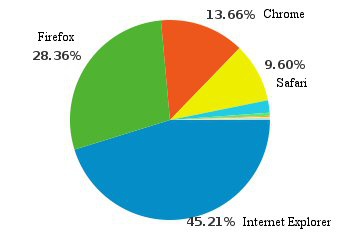
At Camsecure we monitor many things to enable us to provide the best service to our customers we can,
and one of these is Browser Access. Currently users connect to Camsecure with various Browsers in the
percentages shown on the pie chart and the trend is increasing with Firefox and Chrome and slipping away
from Internet Explorer.
The remainin percentage of site access is made via other browsers like opera and sea monkey etc. and
also by mobile devices like Blackberry, iPhone and other mobile devices.
Over 87% of users who connect to Camsecure already have Java support, Over 98% already have Flash
support, Over 98% connect via broadband.
and one of these is Browser Access. Currently users connect to Camsecure with various Browsers in the
percentages shown on the pie chart and the trend is increasing with Firefox and Chrome and slipping away
from Internet Explorer.
The remainin percentage of site access is made via other browsers like opera and sea monkey etc. and
also by mobile devices like Blackberry, iPhone and other mobile devices.
Over 87% of users who connect to Camsecure already have Java support, Over 98% already have Flash
support, Over 98% connect via broadband.